
ONOAYO ONO5 Pro 2.0 Review: The All-in-One Smart Projector That Replaces More Than You’d Expect
By Ryan Castillo | Tech & Electronics Editor, PluggedInPicks • September 08, 2025
Tested over 3 weeks — indoor living room streaming, outdoor backyard screening, gaming sessions, and daily smart OS use across multiple content sources.
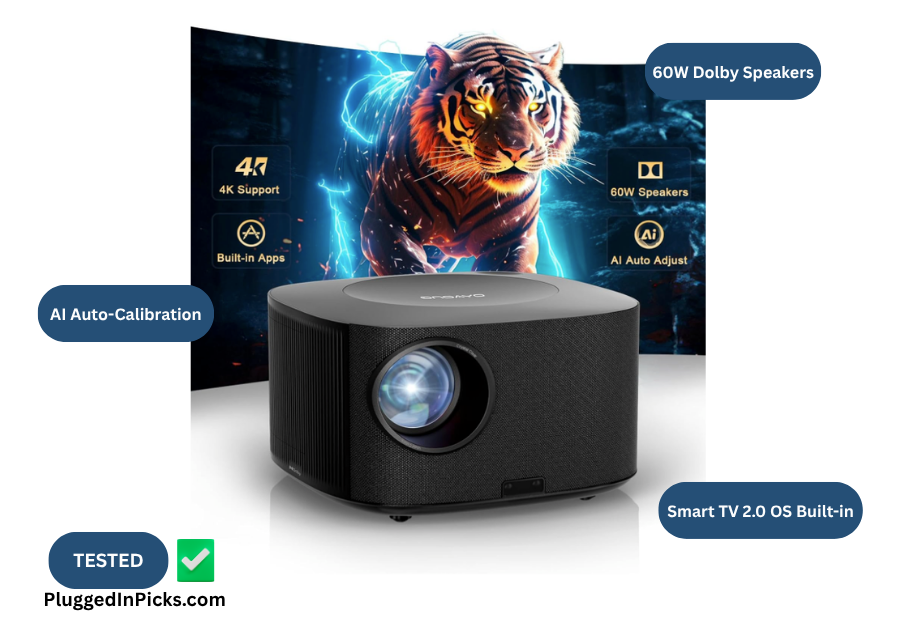
There are rooms a TV doesn’t solve. The backyard on a summer night. The basement with no good wall for a mount. The apartment where you’re not allowed to drill anything and a 65″ screen isn’t in the budget. The bedroom where you want a massive image without a massive footprint. In those situations the math on a projector starts to make sense — and the question shifts from “can this replace my TV” to “can this actually deliver in the scenarios where a TV falls short.”
We tested the ONOAYO ONO5 Pro 2.0 for three weeks across exactly those scenarios to find out.
Quick Verdict
The ONOAYO ONO5 Pro 2.0 is the smart projector we’d recommend to anyone who needs a large-format image in a space or situation where a TV isn’t practical — outdoor setups, flexible rooms, renters, travel, or anyone who wants a 100″+ screen without spending $2,000. The 60W Dolby audio is genuinely room-filling, the VisionIQ auto-calibration makes setup take seconds regardless of surface or angle, and the Smart TV 2.0 OS runs without the lag that defines budget smart projectors. It’s a native 1080P display with 4K support — sharp, color-accurate, and more than sufficient for every use case it’s built for.
Buy this if: You want a large-format image in a space where a TV doesn’t fit, plan to use it both indoors and outdoors, and want a self-contained unit with built-in streaming and audio that doesn’t require a cart full of accessories.
Skip this if: You’re comparing it directly against a dedicated flat panel TV for a permanent living room installation, need true native 4K output, or plan to use it in a bright room during the day.
How We Tested:
Unit tested: ONOAYO ONO5 Pro 2.0, Deep Black. Three weeks of varied use. Here’s exactly what we put it through:
Daily streaming sessions: Used the built-in Smart TV 2.0 OS as the primary streaming source across Prime Video, YouTube, and live TV channels for the full testing window — noting app load times, buffering frequency on WiFi 6, and whether the OS felt responsive or sluggish compared to a dedicated streaming stick.
Audio evaluation: Ran the built-in 60W Dolby speakers across action films, dialogue-heavy dramas, and music content without any external speaker connected — deliberately testing whether the built-in audio was sufficient for typical home use without adding accessories.
Auto-calibration test: Set the projector up in five different positions — standard table placement, ceiling angle, outdoor surface, slight tilt, and off-center wall — and timed how long the VisionIQ auto-focus and keystone correction took to produce a clean image in each scenario.
Outdoor screening sessions: Ran two dedicated outdoor sessions in the backyard after dark — one at roughly 15 feet throw distance, one at 10 feet — noting image size, brightness hold, and whether the audio carried in an open-air environment.
Gaming check: Connected a gaming console via HDMI and tested input latency in game mode across a fast-paced title to assess whether the 18ms latency claim held up in practice.

indoor sessions and we never reached for an external speaker once.
Performance Breakdown: Technical Specs vs. Real-World Use
| Spec | Official Spec | Real-World Note |
|---|---|---|
| Native Resolution | 1920×1080 (4K Supported) | Sharp, clean native 1080P image. “4K supported” means 4K content is downscaled to 1080P for display — not native 4K output. The listing footnotes this clearly. For every use case this projector is built for, the 1080P image is more than sufficient. |
| Brightness | High-brightness LED, ambient light sensor | Held up well in rooms with moderate ambient light — a lamp on in the corner didn’t wash the image out. After dark indoors and outdoors the image was consistently strong. Daytime viewing in a bright room is a stretch, as with all LED projectors in this category. |
| Audio | 60W Dolby Dual Speakers, AI Sound Master | The standout spec that delivers in practice. Room-filling sound at moderate volume indoors — we didn’t connect an external speaker once across three weeks of indoor sessions. Open-air outdoor setups lose some bass presence naturally but the audio carried well for small group screenings. |
| Auto-Calibration | VisionIQ: auto-focus, keystone, obstacle avoidance, screen-fit | Consistently produced a clean image in under 5 seconds across all five test positions. Ceiling angles, off-center placement, and outdoor surfaces all corrected without manual intervention. This is the feature that makes the projector portable in practice, not just on paper — setup takes seconds anywhere you point it. |
| Smart OS | Smart TV 2.0 OS, Prime Video/YouTube/Disney+ | App switching was smooth and startup was fast. No buffering issues on a WiFi 6 connection. Feels closer to a current smart TV interface than the laggy Android forks that budget projectors typically ship with. |
| WiFi | WiFi 6 | Stable throughout all streaming sessions. No buffering on higher-bitrate content streams. A meaningful upgrade over older WiFi standards that create lag on demanding streams. |
| Input Latency | 18ms in Game Mode | Responsive enough for casual to moderate gaming — fast-paced gameplay didn’t show the input lag that makes gaming on projectors frustrating. Competitive players requiring sub-10ms performance will want a dedicated monitor. |
| Connectivity | HDMI, USB, Bluetooth 5.2, 3.5mm Audio, WiFi 6 | Full peripheral flexibility. The Bluetooth remote works through walls at 10 meters without line-of-sight — a practical upgrade over IR remotes that require pointing at the unit. |
| Throw Distance | 1.5 – 18 feet | Flexible enough for small bedrooms and large outdoor setups. At 15 feet outdoors the image size made the backyard feel like a proper screening. |
| Portability | 10″L x 7″W x 12″H | Compact enough to move between rooms or take outdoors without effort. Multiple owners bring theirs on trips — the footprint supports that realistically. |
| Light Source Life | 80,000 hours | At two hours of daily use that’s over 100 years of rated lamp life. Not a purchasing consideration in any practical sense. |
✅ Who It’s For
- Renters who can’t wall-mount a TV and want a large-format image without permanent installation
- Outdoor movie night setups — backyard screenings, patio use, camping, RV trips where a large image after dark is the goal
- Flexible spaces — basement rooms, guest rooms, or any space that serves multiple purposes and doesn’t warrant a permanent TV mount
- Anyone who wants a 100″+ screen without spending $2,000 — the image size ceiling here is 500 inches, and the quality holds up well at large sizes
- Casual to moderate gamers who want a big-screen gaming experience in a flexible setup
❌ Who It’s Not For
- Buyers comparing this directly against a dedicated flat panel TV for a permanent living room setup — a TV wins that comparison
- Buyers who need true native 4K output — the ONO5 Pro 2.0 is native 1080P with 4K support, not a 4K-native display
- Bright room daytime viewers — controlled light or after-dark environments are where this projector performs; a well-lit room during the day works against it
- Competitive gamers who require sub-10ms input latency — the 18ms game mode suits casual play, not tournament-level performance
- First-time projector users who want zero learning curve — the OS is intuitive but budget 20 minutes to get oriented on first setup

screen size that made a backyard feel like a proper screening, not an experiment.
The Outdoor Setup
This is where the ONO5 Pro 2.0 separates itself most clearly from what a TV can do. Two outdoor sessions in the backyard confirmed it — after dark, pointed at a light-colored fence or a portable screen, the image at 15 feet throw distance turned the backyard into a genuine screening environment. Not a phone-pointed-at-a-sheet experiment. An actual movie night setup that a group of people wanted to sit around.
The portability and VisionIQ calibration are what make the outdoor use case frictionless. Carry it outside, set it on a table or tripod, let it calibrate to whatever surface is available, and the first frame appears in under five minutes from carry-out. No measuring throw distance, no keystone menu, no repositioning until the image looks right. One owner in the review base described bringing theirs on RV trips and watching films outdoors under the open sky — the footprint and setup speed make that realistic rather than aspirational.
The audio picture outdoors is honest: open-air environments work against any speaker. The 60W output carried well for a small group but lost the room-filling quality that made indoor sessions impressive. For larger outdoor gatherings, pairing with an external Bluetooth speaker via the 5.2 connection is the move. For a backyard setup with a few people it held up on its own.
The Renter and Flexible Room Case
No wall mount. No drilling. No committing a wall to a permanent screen. The ONO5 Pro 2.0 sits on a shelf, a table, or a tripod and produces a large image on whatever surface is available — and VisionIQ corrects for whatever angle that creates automatically.
For renters, this changes the large-format viewing calculus entirely. The alternative is a TV that requires a mount you can’t install, or a floor stand that takes up more space than the TV itself. A projector on a shelf that produces a 100″ image on the wall opposite requires nothing permanent and packs down when the lease ends.
For flexible rooms that serve multiple purposes — a basement that’s also a playroom, a guest room that needs to function as a home theater occasionally — the projector disappears when it’s not in use in a way a TV never does.
The Audio Situation
We went into testing expecting to connect an external Bluetooth speaker within the first session. We never did. The 60W Dolby output is the feature that most consistently surprised us — not because we expected bad audio, but because built-in projector speakers have a specific reputation for being the weakest part of the package. The ONO5 Pro 2.0 breaks that pattern.
Action sequences filled the room at moderate volume. Dialogue stayed clear without needing to push the volume to compensate. One owner in the review base described the built-in speakers as better than the portable Bluetooth speaker they’d been pairing with their previous projector — that matched our experience across every indoor session.
A friend who stopped by during one evening session asked what soundbar we’d connected it to. We hadn’t — that was the built-in audio running on its own. That’s the clearest signal we can give on where the 60W output actually lands in practice.
The Smart OS in Daily Use
The Smart TV 2.0 OS is where budget smart projectors most commonly fall apart. The ONO5 Pro 2.0 avoided the standard failure modes over the full testing period of daily use — slow app loading, buffering on basic streams, and an interface that feels two OS versions behind current smart TV software.
Prime Video and YouTube loaded cleanly. The 1,500+ live TV channels built into the OS surfaced content without a subscription attached. App switching didn’t require patience. On a WiFi 6 connection the streaming experience was comparable to a current smart TV in terms of responsiveness. Netflix requires a connected HDMI device or sideloading — worth knowing before purchase if Netflix is your primary streaming platform.
The 4K Clarification
This needs a direct answer because the listing language creates real confusion: the ONO5 Pro 2.0 is a native 1080P projector that supports 4K input. Content labeled as 4K will play — it will be displayed at 1080P resolution. The listing footnotes this clearly in the box contents section. The image is sharp and the AI Image Engine optimizes color in real time, and the picture quality holds up well for everything this projector is designed to do. Buyers expecting pixel-for-pixel 4K output should look at the native 4K projector segment, which starts significantly higher up the price ladder.
What Other Owners Are Saying
367 ratings at a 4.7 average — a smaller sample than some products we cover, but the satisfaction rate holds up under scrutiny of the individual reviews rather than just the aggregate number.
Audio is the most praised dimension, with multiple owners specifically noting the built-in speakers exceeded expectations and replaced external audio they’d been using with previous projectors. Consistent with our three-week experience.
The auto-calibration draws specific praise — owners describe setup as taking minutes rather than the adjustment ritual they’d gone through with previous projectors. One owner noted they turned it on and started watching without touching a single manual setting. That matches what we observed across five different positioning scenarios.
The 4K clarification surfaces as the most common point of post-purchase recalibration — not dissatisfaction with picture quality, but buyers who expected native 4K output and needed to adjust their understanding of “4K supported.” The image quality earns consistent positive feedback once expectations are properly set.

surface — and VisionIQ corrected every one in under five seconds without a single manual
menu adjustment.
Final Decision:
The ONOAYO ONO5 Pro 2.0 earns its price in the specific scenarios it’s built for — and those scenarios are more common than the projector category typically gets credit for. Outdoor movie nights, renter setups, flexible rooms, travel, and anyone who wants a 100″+ image without a four-figure TV budget all have a genuine use case here that a flat panel doesn’t solve the same way.
Go in knowing it’s a native 1080P display and that bright-room daytime viewing isn’t its strength, and nothing about the experience disappoints. The 60W audio, the VisionIQ calibration, and a Smart OS that actually runs smoothly make it the most complete self-contained projector package we’ve tested at this price point.
For the buyer whose situation calls for a projector rather than a TV — this is the one worth considering first.
Frequently Asked Questions:
- Is the ONOAYO ONO5 Pro 2.0 truly 4K? It supports 4K input but displays at native 1080P resolution. Content labeled as 4K will play — it will be rendered at 1080P. The listing footnotes this directly in the box contents section. The image is sharp and color-optimized at 1080P; it’s just not pixel-for-pixel 4K output. For the use cases this projector is built for, the 1080P picture quality holds up well.
- How bright is the ONOAYO ONO5 Pro 2.0 in a lit room? In rooms with moderate ambient light — a lamp on, some daylight from a window — the image held up well in our testing. Fully lit rooms during the day are a stretch, as with all LED projectors in this category. After dark indoors and outdoors is where the brightness shines most consistently. Controlled light environments are where you get the best picture.
- Does the ONOAYO ONO5 Pro 2.0 need an external speaker? Not for most use cases. The 60W Dolby dual speakers handled indoor living room sessions and small outdoor gatherings without needing anything connected externally. For larger outdoor events, Bluetooth 5.2 makes adding an external speaker straightforward — but for typical home use the built-in audio is sufficient on its own.
- How does the auto-focus work on the ONOAYO ONO5 Pro 2.0? The VisionIQ system handles focus, keystone correction, obstacle avoidance, and screen-fit automatically in under five seconds. In our testing it corrected for ceiling angles, off-center placement, and outdoor surfaces without any manual menu adjustments. Setup takes seconds regardless of how or where you position it.
- Can the ONOAYO ONO5 Pro 2.0 be used for gaming? Yes, with context. Game mode delivers 18ms input latency via HDMI, which felt responsive for casual to moderate play in our testing. Competitive multiplayer players who require sub-10ms latency should use a dedicated gaming monitor. For console gaming, casual play, and sports — it held up without noticeable lag.
- Does Netflix work on the ONOAYO ONO5 Pro 2.0? Netflix is not natively available through the built-in Smart TV OS on most smart projectors in this category, including the ONO5 Pro 2.0. Two workarounds cover this: connecting a streaming stick via HDMI — a Roku or Fire Stick adds Netflix and the full library of any platform — or using the built-in Chromecast to cast Netflix directly from your phone to the screen without any additional hardware. Prime Video, YouTube, and Disney+ are confirmed natively through the built-in OS.
Related Reading
- Roku Streaming Stick 4K Review — If Netflix is a priority, a Roku Streaming Stick plugged into the HDMI port closes that gap instantly and adds the full Roku channel library alongside the built-in OS. Read our full review.
- Give S14 Outdoor Smart String Lights Review — The ONO5 Pro 2.0 turns a backyard into a screening setup after dark. The Give S14 string lights are what make that outdoor space feel like somewhere worth staying — not just a projector pointed at a fence. Read our full review.
- Echo Show 8 (3rd Gen) Review — For the always-on display use case the projector isn’t designed for — smart home controls, video calls, ambient display — the Echo Show 8 covers the other end of the smart home entertainment setup. Read our full review.