
JDPAG Smart Nightstand Review: A Lot of Nightstand for the Money
By Sara Navarro | Home & Kitchen Editor, PluggedInPicks • October 13, 2025
Tested in a guest bedroom setup over several weeks of regular use.
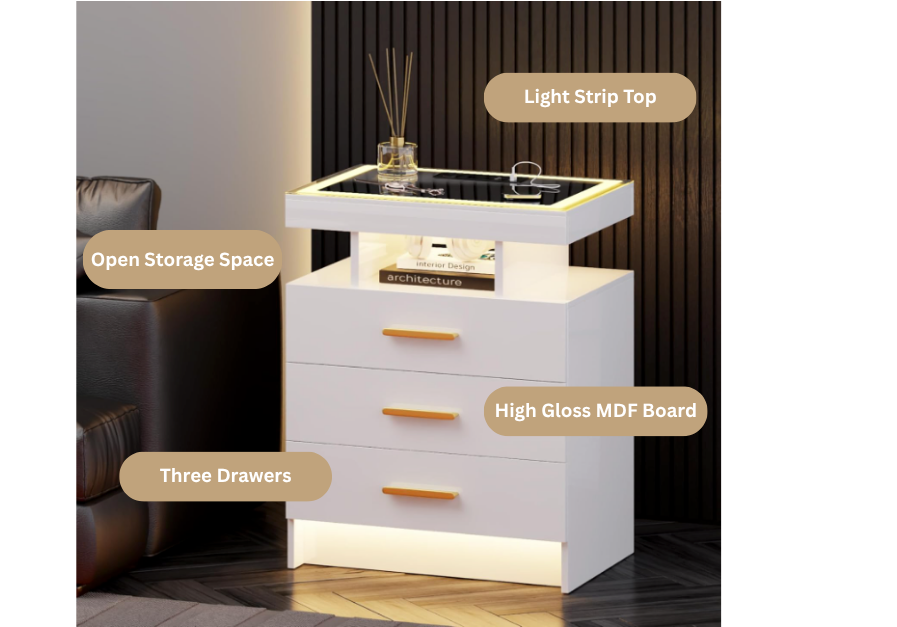
I redid my guest bedroom earlier this year and the nightstand was the last piece I needed to sort out. The brief I gave myself was simple: something that looked polished, didn’t cost a fortune, and ideally handled phone charging so guests wouldn’t be hunting for an outlet at midnight. The JDPAG Smart Nightstand kept coming up in my research — LED lighting, built-in wireless charging, motion sensor, three drawers, high-gloss finish — for well under what comparable pieces were running at furniture retailers. I was skeptical enough to want to test it myself before recommending it.
Several weeks later it’s still in the guest room, and guests have commented on it unprompted. Here’s the honest picture.
Quick Verdict
The JDPAG Smart Nightstand punches above its price point on looks and functionality. The high-gloss finish photographs like furniture that costs significantly more, the motion sensor light is genuinely useful rather than gimmicky, and having wireless charging plus USB and USB-C ports built into the top removes the nightstand clutter problem entirely. The trade-offs are real — the drawer depth is shallower than the product photos suggest, assembly is more involved than the box implies, and the MDF construction means it’s not built for rough handling or heavy loads. For a guest bedroom, home office side table, or any space where you want visual impact and smart functionality without a premium price, it delivers. For a primary bedroom nightstand that needs to handle years of daily wear, you’d want to set expectations accordingly.
Buy this if: You want a modern, feature-rich nightstand that looks expensive, handles device charging seamlessly, and creates a welcoming setup for guests or a secondary space.
Skip it if: You need drawers deep enough for bulkier items like hardcovers or tablets, plan to put significant weight on it regularly, or want furniture built to last a decade of heavy daily use.
How I Tested:
- Setup and assembly: Assembled it myself in the guest bedroom — tracked time, reviewed the instruction quality, and noted where the process got fiddly. Tools are included, which matters.
- Lighting: Observed the motion sensor behavior across multiple entries and exits from the room — response time, auto-off timing, and how the three color modes actually read in a real bedroom environment rather than a product photo.
- Charging: Tested wireless charging with an iPhone and USB-C with a standard cable. Noted whether the wireless pad placement on the top surface is practical for actual overnight use.
- Storage: Loaded the drawers with realistic guest bedroom contents — a paperback, a phone charger, a small candle, a notepad — to gauge usable capacity against what the listing implies.
- Finish and durability: Monitored the high-gloss acrylic top for scratching and smudging over several weeks of regular use, including a water glass sitting on it overnight on multiple occasions.

button, and USB/USB-C ports are all accessible from the same side of the unit. In practice
the layout is cleaner than it looks here. The wireless pad sits far enough back on the top
surface that a phone charging overnight doesn’t crowd the front where a water glass or
diffuser would sit.
Performance Breakdown: Technical Specs vs. Real-World Use
| Feature | Spec | Real-World Note |
|---|---|---|
| Dimensions | 15.7″D x 19.7″W x 24″H | Standard nightstand height. Sits correctly beside most bed frames without feeling too short or too tall. |
| Max Weight Capacity | 100 lbs | More than adequate for nightstand use — lamp, books, phone, water glass. Don’t treat it as a storage bench. |
| Frame Material | Engineered wood (MDF) | Solid enough for a nightstand. Not heirloom furniture — treat it accordingly. |
| Top Material | Acrylic | High-gloss and visually striking. Shows fingerprints and water rings — wipe down regularly. |
| Finish | High-gloss, scratch-resistant | Scratch-resistant doesn’t mean scratch-proof. Felt pads under anything abrasive are worth adding. |
| Drawers | 3 | Three drawers handle bedside essentials well. Drawer depth is shallower than marketing photos imply — worth knowing before purchasing. |
| LED Colors | Blue, warm yellow, white | Warm yellow reads best in a bedroom environment. Blue is striking but polarizing. White is clean and neutral. |
| Charging | Wireless + USB + USB-C | The three-in-one charging setup on the top surface is genuinely useful. Wireless pad placement is practical for overnight charging. |
| Motion Sensor | Auto-on when approached, auto-off after 30 seconds | The most practically useful feature in a guest bedroom — no fumbling for a switch in an unfamiliar room. |
| Assembly | Required — tools included | More involved than a simple flat-pack. Budget an hour and follow the instructions carefully. |
| Available Colors | White, Black | White shows every mark but photographs beautifully. Black hides smudges better in daily use. |
✅ Who It’s For
- Guest bedroom setups where visual impact matters
- Anyone eliminating nightstand cable clutter
- Home office or living room end table use
- Renters who want a furnished look without a big investment
- Gift buyers looking for something that photographs well
❌ Who It’s Not For
- Anyone needing deep drawer storage for bulkier items
- Buyers expecting solid wood construction at this price
- Primary bedroom use with years of heavy daily wear expected
- Anyone who dislikes regular surface maintenance
- Households with young children who pull on furniture

levels each. Warm is what I kept it on in the guest room. It reads like a soft bedside lamp at
the lower brightness settings rather than an accent light, which is the right call for a sleep
environment. The blue mode looks exactly as dramatic in person as it does here — striking,
but better suited to a media room than a bedroom.
The LED and Motion Sensor — Actually Useful
I’ll be honest: when I ordered this I assumed the LED lighting would be the feature that looked great in product photos and got ignored in real life. I was wrong about that.
The motion sensor is the standout. Walk into the guest room at night and the light comes on automatically — warm, low, not harsh. It stays on for 30 seconds after you leave and shuts off on its own. For guests in an unfamiliar room, that’s a genuinely thoughtful detail. I’ve had guests mention it without prompting, which is the clearest signal that a feature is doing real work rather than just appearing on a spec sheet.
The three color modes are worth spending a minute on when you first set it up. Warm yellow is what I landed on — it reads like a soft ambient light in the evening, not a task light. White is clean and works well if the room has a modern or minimal aesthetic. Blue is the most dramatic and the one most likely to polarize — it looks striking in photos and feels a bit club-like in person. Worth trying all three before you commit.
Brightness is adjustable on all three, which matters more than I expected. The lowest setting is genuinely low — useful as a nightlight rather than a reading light.
Charging Setup — The Right Problem Solved
The nightstand clutter problem in most guest bedrooms is cables. One phone charger snaking across the top, maybe a lamp cord, possibly a power strip on the floor. The JDPAG Smart Nightstand solves this cleanly — wireless charging pad built into the top surface, USB and USB-C ports accessible from the same position, no external charging brick sitting on the tabletop.
In practice the wireless charging pad placement is well thought out. It sits toward the back of the top surface, leaving the front clear for a water glass or phone while it charges. USB and USB-C ports are tucked neatly rather than protruding awkwardly. For guests with different devices, having all three charging options in one place without any cables visible is a setup that feels more considered than the price suggests.
Storage — Manage Expectations
Three drawers is a genuine plus for a nightstand at this footprint. Loaded the guest room drawers with a paperback, phone cables, a small journal, and a sleep mask — everything fit without issue. The one honest caveat is drawer depth: they’re shallower than the product photos suggest, so bulkier items like a large hardcover or a full-size tablet will be a tighter fit.
The drawer action is smooth and the glide mechanism feels solid. No wobble, no catching. What you can see in the product photos is accurate — these are nightstand drawers, not dresser drawers — sized and built for what lives beside a bed, not for general bedroom storage
Finish and Build — Looks Premium, Handle With Some Care
The high-gloss acrylic top is what makes the JDPAG Smart Nightstand photograph the way it does. In person it reads as genuinely upscale — the kind of finish you see on furniture at two or three times the price. The trade-off is maintenance. Fingerprints show. A water glass left overnight without a coaster will leave a ring. I wipe it down once a week in the guest room and it stays looking sharp.
The MDF frame is honest construction for the price. It’s not going to rack or wobble under normal use — I’ve had no stability issues — but it’s not solid wood and it doesn’t pretend to be. Avoid dragging it across hard floors without felt pads on the feet, and don’t stack heavy objects on it expecting the same tolerance as a hardwood piece.
Assembly takes longer than the box makes it seem. The instructions are clear and all tools are included, but the construction is more intricate than a standard flat-pack. One reviewer put it well: it’s straightforward but not fast. Budget a full hour and don’t rush the drawer rail installation — that’s where most of the fiddly work is.
What Other Owners Are Saying
Across verified reviews the pattern is consistent: the lighting and charging features land well, the finish reads as more expensive than the price, and assembly takes longer than expected. Several owners specifically call out the motion sensor as a standout feature — the auto-off behavior in particular comes up consistently as a feature that feels more considered than the price suggests. The main friction point is drawer depth — buyers expecting deeper storage mention that bulkier items are a tighter fit than the product photos suggest. That’s a fair observation and one worth setting expectations around before purchasing.
A small number of reviews mention minor cosmetic damage on arrival — one owner noted a broken panel section on the back. Worth inspecting on delivery and contacting the seller promptly if anything is off.
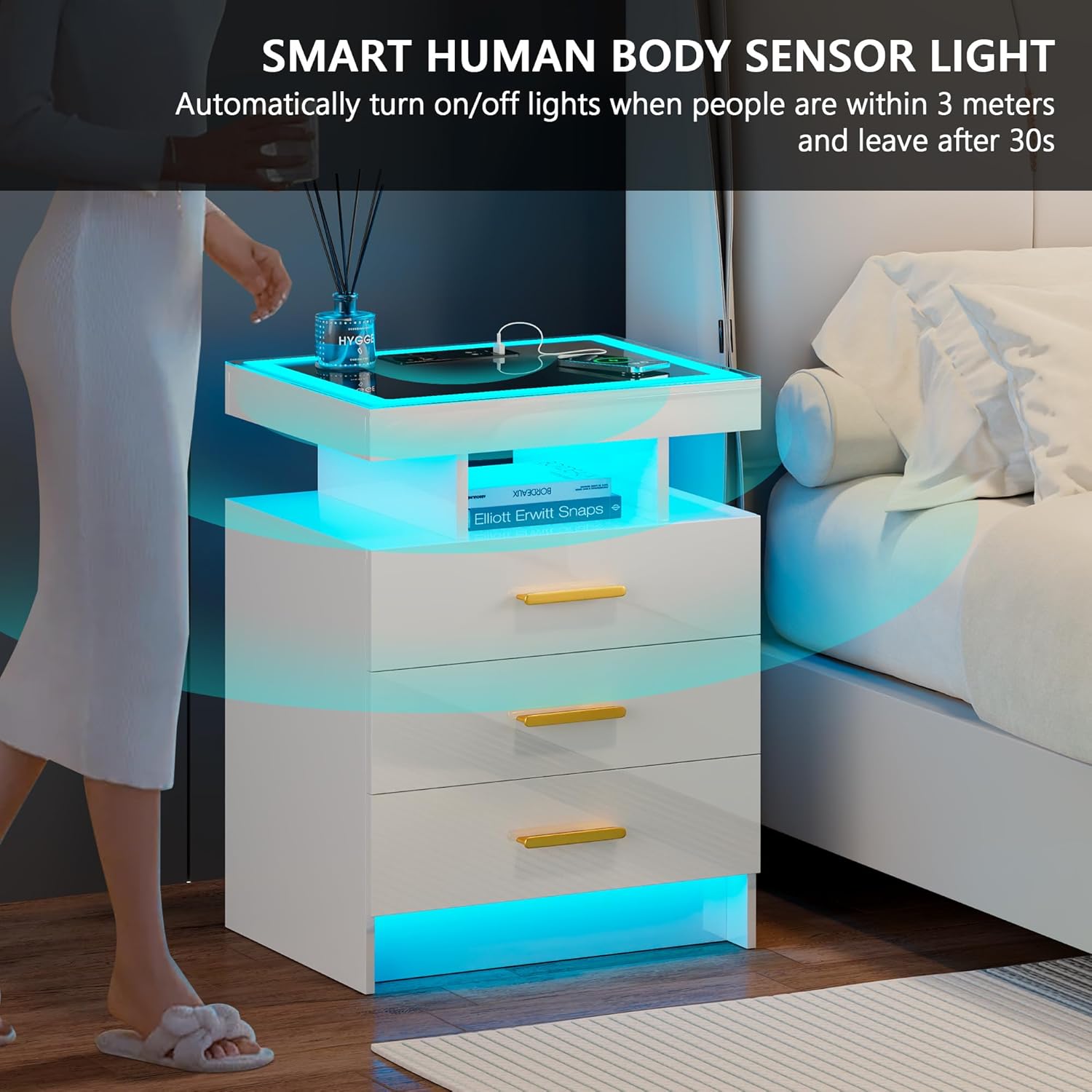
time you reach the nightstand, not when you’re already standing over it. That range
makes it genuinely useful as a room entry light rather than just a close-proximity trigger.
The under-shelf glow and base LED strip together give the whole unit a floating quality
in a dark room that the product photos actually undersell.
Final Decision:
The JDPAG Smart Nightstand does something that’s genuinely difficult at this price point: it looks like it costs more than it does, and the smart features actually earn their place rather than just appearing on a spec sheet. The motion sensor light has been the most commented-on detail by every guest who’s stayed in the room — it solves a real problem without requiring anyone to find a switch in an unfamiliar space. The three-in-one charging setup keeps the top surface clean and covers whatever device a guest walks in with. And the high-gloss finish photographs beautifully while holding up reasonably well to regular use with basic maintenance.
The limitations are real and worth naming clearly. The drawer depth is shallower than the product photos imply — worth setting expectations on before purchasing. The MDF construction requires more careful handling than solid wood. Assembly takes a full hour if you do it properly. None of those things are deal-breakers for a guest bedroom or secondary space — they’re just honest context for setting expectations correctly. Go in knowing what this nightstand is built for, and it consistently delivers on that promise.
Frequently Asked Questions:
- Does the JDPAG Smart Nightstand require assembly? Yes — and it’s more involved than a basic flat-pack. All tools are included and the instructions are clear, but the drawer rail installation in particular requires patience. Budget a full hour for assembly rather than the 20-30 minutes some flat-pack furniture takes.
- How does the motion sensor work? The JDPAG Smart Nightstand has a human body sensing system built in. When you approach, the LED light activates automatically. It fades out 30 seconds after you move away. You can also control the light manually — color and brightness are both adjustable. The sensor can be turned off if you prefer manual-only operation.
- Is the wireless charging compatible with all phones? The wireless charging pad is compatible with Qi-enabled devices — most current iPhones and Android flagships. Devices without Qi wireless charging capability will need to use the USB or USB-C ports instead, both of which are accessible from the top surface.
- How tall is the JDPAG Smart Nightstand? 24 inches tall, 19.7 inches wide, and 15.7 inches deep. That height sits correctly beside most standard and queen bed frames. For very tall platform beds or beds with high mattress stacks, measure your specific setup before purchasing.
- Are the drawers big enough for a book? A standard paperback fits comfortably. A larger hardcover or a tablet will be a tighter fit depending on the specific dimensions. These are bedside essentials drawers — phone chargers, a sleep mask, small personal items — rather than general storage drawers.
- Does the LED light stay on all night? No — the motion sensor auto-off activates 30 seconds after you leave the area. The light won’t stay on unattended. If you want continuous ambient light, the manual brightness control allows you to set it and leave it on, but the default behavior is auto-off.
- What’s the best LED color mode for a bedroom? Warm yellow is the most bedroom-friendly — soft, ambient, easy on the eyes at night. White is clean and works well in modern or minimal spaces. Blue is the most striking visually but the most polarizing in a sleep environment. All three are adjustable in brightness, so try the lowest warm yellow setting first for nighttime use.
- How does the JDPAG Smart Nightstand compare to other smart nightstands? The JDPAG Smart Nightstand stands out at its price point for combining motion sensor lighting, three-in-one charging, and a high-gloss finish that reads more expensive than it is. Competitors at similar prices often offer one or two of those features but not all three. At higher price points you’ll find more substantial build materials and deeper drawer storage — worth considering if this is a primary bedroom piece you expect to use for many years.
Related Reading
- Foldable Desk Review — if you’re furnishing a guest room that doubles as a workspace, our foldable desk review covers the best compact option for a room that needs to do two jobs
- Echo Show 8 Review — a smart nightstand pairs naturally with a smart display; our Echo Show 8 review covers whether it earns its place on a bedside table
- Sunbeam Heated Blanket — a guest bedroom isn’t complete without it; our Sunbeam review covers the best heated blanket for keeping guests comfortable without touching your thermostat