
FLEXISPOT EN1 Standing Desk Review: The One-Piece Upgrade That Actually Holds Up
By Sara Navarro | Home & Kitchen Editor, PluggedInPicks • August 28, 2025
Tested over 4 weeks of daily home office use — stability under load, height adjustment consistency, assembly process, and real-world desktop performance with a dual-monitor setup.
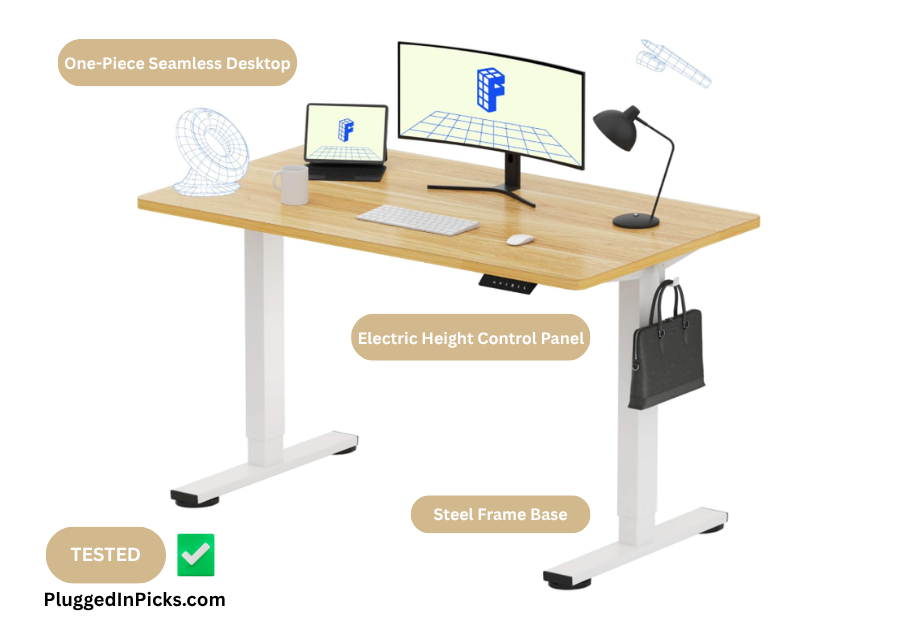
My last standing desk lasted eight months before the two-piece desktop became the reason I dreaded sitting down to work. The gap that opened up between the panels wasn’t dramatic at first — just enough to catch a mouse pad edge, just enough to feel every time my wrist crossed it. By month six it was wide enough that I’d stopped using the right half of the surface entirely. That’s not a standing desk problem. That’s a two-piece desktop problem.
The FlexiSpot EN1 is built around solving exactly that. One seamless desktop, no seam to split, no gap to develop. After four weeks of daily use in a home office with two monitors, a laptop dock, and a full workday’s worth of coffee mugs and notebooks — here’s whether that promise holds in practice.
Quick Verdict
The FlexiSpot EN1 is the standing desk I’d recommend to anyone who’s been burned by a cheaper two-piece alternative and wants a clean, stable surface that doesn’t make your workspace feel like a compromise. The one-piece maple desktop is the real differentiator — solid, smooth, and genuinely pleasant to work on. The height range covers sit-to-stand for most adults, the four memory presets make switching effortless, and the assembly is straightforward enough for one person with a free afternoon.
Buy this if: You want a reliable electric standing desk at an accessible price point, work with multiple monitors, and want a desktop surface that won’t develop a gap or wobble over time.
Skip this if: You need the motor control panel on the left side, work primarily on hard floors without a mat, or want built-in cable management without buying additional accessories.
How I Tested:
Unit tested: FlexiSpot EN1, 48″x24″, Maple White. Four weeks of daily home office use. Here’s exactly what I put it through:
Daily workstation setup test: Ran the desk as my primary work surface every day for four weeks — two 27″ monitors, a laptop on a separate arm, keyboard, mouse, and all the peripheral clutter that accumulates in a real home office setup. Noted surface feel, stability under active use, and whether anything about the desk made the workday harder.
Height adjustment consistency check: Cycled through all four memory presets multiple times per day for the full testing window. Timed the transition from seated to standing height. Noted whether the motor hesitated, stuttered, or required manual intervention at any point.
Stability test under load: Loaded the desk to approximately 60 lbs of equipment and tested for wobble during height transitions, typing, and deliberate lateral pressure on the desktop surface. Repeated on both carpet and hard floor to compare suction cup performance.
Assembly process documentation: Assembled solo, tracking time, tool requirements, and any steps that required a second set of hands or created friction. Noted the pre-drilled hole situation documented by other owners.

from seated to full standing height is smooth enough that you don’t think about it mid-session.
Performance Breakdown: Technical Specs vs. Real-World Use
| Spec | Official Spec | Real-World Note |
|---|---|---|
| Desktop | One-Piece Seamless (tested: 48″x24″) | The seamless surface is the reason to buy this over cheaper alternatives. No seam, no gap, no edge catch. Four weeks of dual-monitor daily use and the surface feels exactly as it did out of the box. |
| Height Range | 28.9″ – 46.5″ | Covered the full range I needed for seated and standing positions at 5’6″. At the low end it’s a standard desk height. At the high end it’s comfortable standing for extended sessions. |
| Lifting Mechanism | Single Motor, Electric | Smooth and quiet at all tested heights. The transition from 29″ to 46″ takes roughly 15–18 seconds — unhurried but not slow enough to be frustrating. The motor eases into stops rather than cutting abruptly, which feels noticeably more premium than the budget end of this category. |
| Memory Presets | 4 presets | The feature that makes a standing desk a standing desk in practice. Without presets most people stop adjusting height within two weeks. Having my seated and standing positions locked in meant I actually used both positions every day. |
| Weight Capacity | 176 lbs | Tested at roughly 60 lbs of equipment with no flex or instability in the frame. The one-piece desktop contributes meaningfully to overall rigidity here. |
| Motor Panel Position | Right side only | The panel cannot be repositioned to the left side. If your power outlet or cable setup favors the left, the cord is long enough to cross the desk — but the control panel stays right. Worth knowing before you plan your cable management. |
| Assembly | Included tools, detailed instructions | Solo assembly took about 45 minutes with only the included tools. Instructions are clear and follow a logical sequence. Having a second person for the desktop positioning step makes it easier but isn’t required. |
✅ Who It’s For
- Anyone who’s owned a two-piece standing desk and regretted it — the one-piece desktop solves the problem that ends those desks
- Home office workers running dual monitors — 48×24 handles two 27″ screens comfortably with room for peripherals
- First-time standing desk buyers who want a clean upgrade without spending premium prices
- People who prioritize actually using the sit-to-stand function — the four memory presets make it frictionless enough that the habit sticks
❌ Who It’s Not For
- People who need the motor control panel on the left side — it’s fixed to the right and cannot be repositioned
- Hard floor users without a mat — suction cup feet lose grip on tile and hardwood at higher speeds; a rubber mat solves it but adds a step
- Anyone expecting built-in cable management — the desk has none. Budget separately for a cable tray or management solution
- Buyers who want a larger surface — the 48×24 is genuinely spacious but if you run three monitors or need horizontal spread, the 55×28 variant is worth considering

twice and forget. Having seated and standing heights locked in from day two meant I stopped
thinking about the controls entirely.
Four Weeks on the Desk — What I Actually Found
The Desktop Surface The one-piece construction is not a subtle difference. I noticed it on day one and kept noticing it in the specific way you notice the absence of something annoying — there was no edge to catch, no seam to cross, no dead zone in the middle of the surface where I’d unconsciously stopped placing things.
The maple finish has a clean, slightly warm tone that photographs better than it reads in listing images. It’s not trying to look like solid wood — it reads like what it is, a well-finished laminate surface — but it looks deliberate rather than cheap. By week two I’d covered a portion of it with a desk mat for comfort during typing sessions, which is worth planning for. The surface finish marks with prolonged wrist contact and the texture isn’t padded. A desk mat is the practical call.
Height Adjustment and the Memory Presets The motor is the quietest part of the desk. Transitions happen smoothly and the four memory presets loaded without fuss — I set my seated height on day one and my preferred standing height by the end of day two, and didn’t think about the controls again. That’s the sign of a feature that’s actually working.
My standing sessions ran about 45 minutes at a time across the testing window. The desk held position without drift or descent, which sounds like a baseline expectation but isn’t universal in this price range. A colleague who’s been using a different brand in this category for two years mentioned that his desk has developed a slow descent over time that requires occasional recalibration. The EN1 didn’t show that behavior in four weeks — longevity beyond that window is something owners with more time on the desk can speak to better than I can.
Assembly — The Honest Version
Solo assembly is doable. I did it in about 45 minutes, which is on the faster end of what owners report — some describe closer to an hour with two people. The instructions are clear and the included tools cover most of the build.
The motor panel and control unit mount on the right side only. There’s no hardware configuration for a left-side install. The power cable is long enough to route across the back of the desk if your outlet is on the left, but the panel itself stays right. Plan your cable situation around that before assembly rather than after.
Stability Under Real Workstation Load
With two monitors, a laptop arm, keyboard, mouse, speakers, and the usual desktop scatter, the desk ran at roughly 60 lbs of equipment through the testing window. No flex in the desktop under that load. No wobble during typing sessions. Height transitions were smooth with full equipment weight in place.
On carpet — which is where I ran the desk for the majority of the testing period — stability was consistent. I tested on a hard floor section of the home office toward the end of the window and noticed some movement from the suction cup feet at higher transition speeds. A rubber mat resolved it immediately. If your office is hardwood or tile, budget for a mat.
What Other Owners Are Saying
Across the review base — which sits north of 7,000 ratings at a 4.5 average — the patterns are consistent with what I found over four weeks, and extend further into the ownership window than my testing covered.
The one-piece desktop draws the strongest praise, particularly from owners who are explicitly replacing two-piece desks. Multiple owners document the same experience: a previous desk developed a gap between panels over months of use, the EN1 hasn’t. That’s the product delivering on its core promise over a longer window than I can personally confirm.
The motor longevity picture is positive across the review base. One owner documented regular use since April 2024 — adjusting height multiple times daily — with no mechanical issues through late 2025. That’s the kind of long-term data point I can’t generate in four weeks but worth flagging as what consistent owners report.
The right-side-only control panel comes up in reviews — owners who wanted left-side placement mention it, though most find the cable length workable.
Price sensitivity appears in the reviews primarily in a positive direction — owners who compared this against premium standing desks in the $400–$900 range describe the EN1 as delivering the features that matter at a fraction of the cost. The trade-offs they accept are the ones I found: no built-in cable management and the fixed panel position.
Customer service gets unprompted praise across multiple reviews — owners who received damaged units on delivery describe fast replacements and responsive communication. One repeat buyer purchased a second EN1 specifically because of the service experience on the first.

that accumulates during a real workday — the maple finish looks warmer in person than it
reads in listing photos.
Final Decision:
The FlexiSpot EN1 does what it’s designed to do without asking you to overlook much to get there. The one-piece desktop is the right starting point for this product — it solves the most common failure mode of the two-piece alternatives that dominate the lower end of this category, and it does so without pushing the price into premium territory. Four weeks of daily use confirmed what the review base suggests: the surface stays stable, the motor stays quiet, and the four memory presets make the sit-to-stand habit stick in a way that desks without them often don’t.
The caveats worth knowing going in are real but manageable. Plan cable management separately — the desk doesn’t include it. If you’re on hard floors, a grip mat belongs in the cart alongside the desk.
For a first-time standing desk buyer or anyone replacing a two-piece desk that’s started to show its limitations — this is the call.
Frequently Asked Questions:
- Is the FlexiSpot EN1 worth it for a home office? For daily home office use with one or two monitors, yes. The one-piece desktop is stable and spacious, the four memory presets make the sit-to-stand habit practical rather than theoretical, and the price sits well below the premium segment of the standing desk category. The trade-offs — no built-in cable management and the right-side-only control panel — are both manageable with minimal prep.
- Can the FlexiSpot EN1 hold two monitors? The 48×24 surface handles two 27″ monitors comfortably with room for a keyboard, mouse, and standard desktop peripherals. I ran that exact configuration throughout the four-week testing window without any stability issues. The 176 lb weight capacity is well above what a typical dual-monitor setup requires.
- Does the FlexiSpot EN1 wobble? At normal workstation loads on carpet or a rubber mat — no, not in my testing. The one-piece desktop contributes meaningfully to overall rigidity. On hard floors without a mat, the suction cup feet can shift slightly at higher transition speeds. A grip mat solves it. If you push hard on the frame edge intentionally, you’ll feel movement — that’s true of nearly every desk in this price range.
- How long does the FlexiSpot EN1 take to assemble? Solo assembly ran about 45 minutes in my experience using only the included tools. Two people can likely get it done faster, particularly for positioning the desktop onto the frame. The instructions are clear and the steps are straightforward throughout.
- Can you put the control panel on the left side of the FlexiSpot EN1? No — the motor control panel mounts on the right side only. There’s no hardware option for a left-side install. The power cable is long enough to route across the desk back if your outlet setup favors the left, but the control panel position is fixed.
- Does the FlexiSpot EN1 come with cable management? No built-in cable management is included. For a clean setup, a separate under-desk cable tray or cable management spine is worth adding to your order. It’s the most common practical addition owners mention after getting the desk set up.
- What is the height range of the FlexiSpot EN1? The height adjusts from 28.9″ to 46.5″. That range works for most adults in both seated and standing positions — at 5’6″ I had comfortable headroom on both ends. Taller users should verify the standing height against their preferred ergonomic position before purchasing.
Related Reading
- Anker 12-in-1 USB-C Hub Review — Once the desk is set up, cable management becomes the next conversation. The Anker 12-in-1 is the hub we’d recommend for anyone consolidating peripherals into a cleaner workstation — one cable to the laptop, everything else organized through a single dock. Read our full review.
- Getpals 3-in-1 Wireless Charger Review — A standing desk setup benefits from eliminating as many cables as possible from the surface. The Getpals 3-in-1 handles phone, earbuds, and watch charging from one pad — one less cable cluster on an otherwise clean desktop. Read our full review.
- Foldable Desk Review — Not every room has space for a full standing desk setup. If you’re working in a smaller space or need a secondary surface that disappears when the workday ends, our foldable desk review covers the option worth considering. Read our full review.